Prometheus Exporter documentation
- 6 minutes read - 1253 wordsI have a new router that runs OpenWRT and it provides a Prometheus (Node) Exporter (written in Lua)
NOTE The
prometheus-node-exporter-luaExporter package is a 4KB (!) script
As I’m sure is a common experience for others, it’s great that there’s an Exporter and a wealth of metrics exposed by it. One problem is that there’s no guidance on how to use these metrics to construct useful PromQL queries and Alertmanager alerts.
I think it would be useful for Exporters to publish a Documentation endpoints (perhaps /docs to go along with /metrics) that would include such guidance.
Let’s create an example.
Since I’m unfamiliar with the prometheus-node-exporter-lua these examples are going to be hypothetical uses of the metrics because I really don’t (yet) know how best to use them!
Naive Assessment
Here is the output from scraping my router’s /metrics endpoint:
curl \
--silent \
--url localhost:9100/metrics \
|  awk '/^# TYPE/ { sub("^# TYPE ", ""); print }'
node_scrape_collector_duration_seconds gauge
node_scrape_collector_success gauge
node_nf_conntrack_entries gauge
node_nf_conntrack_entries_limit gauge
node_boot_time_seconds gauge
node_context_switches_total counter
node_cpu_seconds_total counter
node_intr_total counter
node_forks_total counter
node_procs_running_total gauge
node_procs_blocked_total gauge
node_filefd_allocated gauge
node_filefd_maximum gauge
node_load1 gauge
node_load5 gauge
node_load15 gauge
node_memory_MemTotal_bytes gauge
node_memory_MemFree_bytes gauge
node_memory_MemAvailable_bytes gauge
node_memory_Buffers_bytes gauge
node_memory_Cached_bytes gauge
node_memory_SwapCached_bytes gauge
node_memory_Active_bytes gauge
node_memory_Inactive_bytes gauge
node_memory_Active_anon_bytes gauge
node_memory_Inactive_anon_bytes gauge
node_memory_Active_file_bytes gauge
node_memory_Inactive_file_bytes gauge
node_memory_Unevictable_bytes gauge
node_memory_Mlocked_bytes gauge
node_memory_SwapTotal_bytes gauge
node_memory_SwapFree_bytes gauge
node_memory_Dirty_bytes gauge
node_memory_Writeback_bytes gauge
node_memory_AnonPages_bytes gauge
node_memory_Mapped_bytes gauge
node_memory_Shmem_bytes gauge
node_memory_KReclaimable_bytes gauge
node_memory_Slab_bytes gauge
node_memory_SReclaimable_bytes gauge
node_memory_SUnreclaim_bytes gauge
node_memory_KernelStack_bytes gauge
node_memory_PageTables_bytes gauge
node_memory_NFS_Unstable_bytes gauge
node_memory_Bounce_bytes gauge
node_memory_WritebackTmp_bytes gauge
node_memory_CommitLimit_bytes gauge
node_memory_Committed_AS_bytes gauge
node_memory_VmallocTotal_bytes gauge
node_memory_VmallocUsed_bytes gauge
node_memory_VmallocChunk_bytes gauge
node_memory_Percpu_bytes gauge
node_network_receive_bytes_total counter
node_network_receive_packets_total counter
node_network_receive_errs_total counter
node_network_receive_drop_total counter
node_network_receive_fifo_total counter
node_network_receive_frame_total counter
node_network_receive_compressed_total counter
node_network_receive_multicast_total counter
node_network_transmit_bytes_total counter
node_network_transmit_packets_total counter
node_network_transmit_errs_total counter
node_network_transmit_drop_total counter
node_network_transmit_fifo_total counter
node_network_transmit_colls_total counter
node_network_transmit_carrier_total counter
node_network_transmit_compressed_total counter
node_openwrt_info gauge
node_time_seconds counter
node_uname_info gauge
Around half of these metrics emit constant values (for my router) and so are uninteresting. Of those that don’t, there are several that emit interesting (fluctuating) values:
node_memory_Active_anon_bytes
node_memory_Active_file_bytes
node_load1
node_load15
node_load5
scrape_duration_seconds
NOTE The above are all constrained by
{job="foo"}wherefoois the name of my router.
Presumably for space-saving reasons, the emitted metrics include # TYPE descriptors by necessity as this includes the metrics __name__’s as shown above but does NOT include # HELP helpers.
These metrics can be generalized using PromQL RegEx functionality as:
{__name__="scrape_duration_seconds"}{__name__=~"node_memory_Active_(anon|file)_bytes}{__name__=~"node_load[0-9]{1,2}}
NOTE I’ve omitted
,job="foo"on each of the above for clarity.
Prometheus metric names are – quite logically – a special case of the use of labels. The metric name is stored internally as the label name __name__. This can be confusing but is powerful. One end-user reason that this power is available is to apply RegExes to metric names. While node_load* isn’t permitted as a metric name in PromQL, it is permitted as a label value Regex {__name__=~"node_load*"}
NOTE To specify that the value is a RegEx,
=~must be used between the label name and value.
These metrics yield the following graphs:
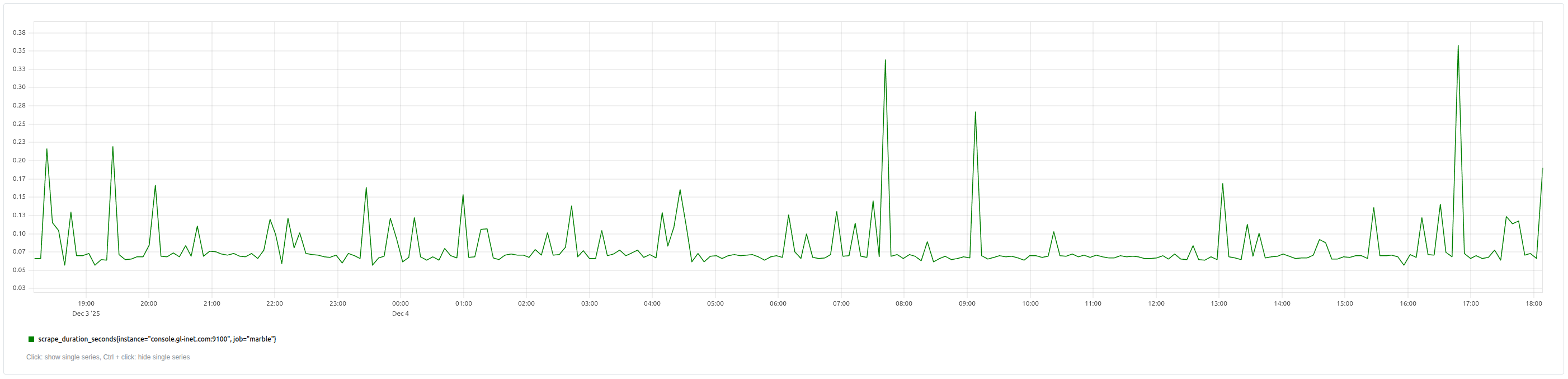
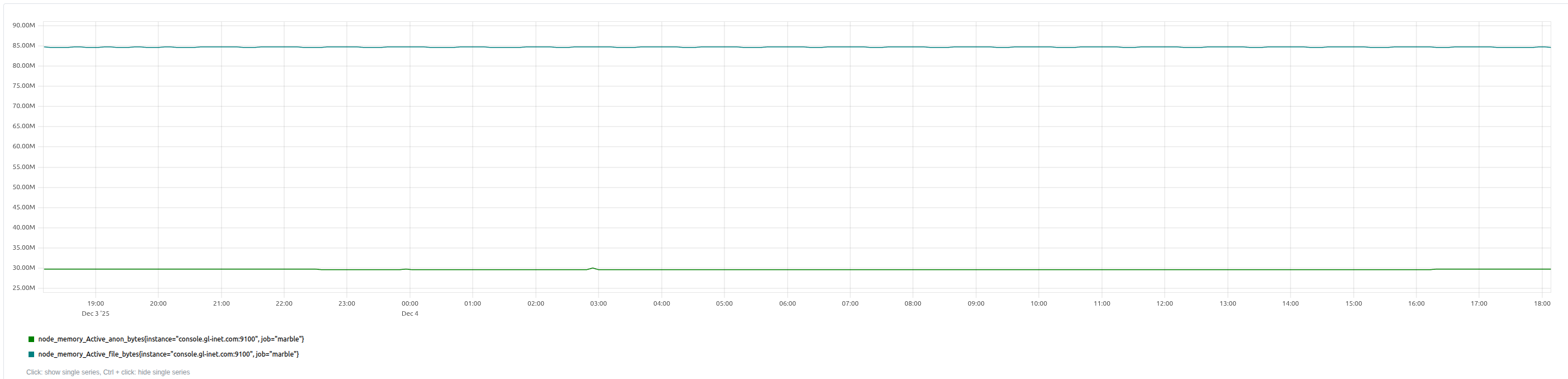
![node_load[0-9]{1,2}](/images/251204.node_load.png)
And, it may be interesting to alert if:
- Scrape duration exceeds its 95% percentile (over the past 24 hours) for 5 minutes
- Node Load exceeds 1.25
- Active memory bytes exceeds 90MiB
Let’s define PromQL and alerts for the above:
The could be specified (using YAML) as Alertmanager alerts of the form:
rules.yml:
groups:
- name: openwrt_alerts
  rules:
  - alert: HighScrapeDurationP95Anomaly
    ...
  - alert: HighNodeLoad
    ...
  - alert: HighNodeActiveMemory
    ...
Scrape Duration
scrape_duration_seconds{job="foo"}>quantile_over_time(0.95,scrape_duration_seconds{job="foo"}[1d])
This condition will always be true 5% of the time. It becomes more interesting if it remains true for extended periods of time. To achieve this we can use the Alert’s for property
alert: HighScrapeDurationP95Anomaly
expr: |
  scrape_duration_seconds{job=foo"}
  >
  quantile_over_time(0.95, scrape_duration_seconds{job="foo"}[1h])
for: 5m
labels:
  severity: warning
annotations:
  summary: "Scrape duration is above its 1-hour 95th percentile for {{ $labels.instance }}"
  description: "The scrape duration ({{ $value }}) for instance {{ $labels.instance }} is anomalously high"
Node Load
{__name__=~"node_load[0-9]{1,2}",job="foo"} > 1.25
It’s unclear what the units are for this metric1. Naively, I’d assumed it should not exceed 1.0 but the measurements by my router do exceed 1.0, so…
alert: HighNodeLoad
expr: |
  {__name__=~"node_load[0-9]{1,2}",job="foo"} > 1.25
for: 5m
labels:
  severity: warning
annotations:
  summary: "Node load is above 1.25 for {{ $labels.instance }}"
  description:  "The node load ({{ $value }}) for instance {{ $labels.instance }} is anomalously high"
1 - Subsequently chatting with Gen AI, I learned that the value corresponds to number of cores in the router. As a result I realized 1.25 corresponds to 62.5%
Node Active Memory
{__name__=~"node_memory_Active_(anon|file)_bytes",job="foo"} > 90*1024*1024
The 90MiB value is arbitrary but observed from experience with my router. PromQL doesn’t provide units for e.g. Mebibytes and so this value is shown explicitly here for clarity.
alert: HighNodeActiveMemory
expr: |
    {__name__=~"node_memory_Active_(anon|file)_bytes",job="foo"} > 90*1024*1024
for: 5m
labels:
  severity: warning
annotations:
  summary: "Node active memory is above 90MiB for {{ $labels.instance }}"
  description: "The node active memory ({{ $value }}) for instance {{ $labels.instance }} is anomalously high"
Prometheus Operator CRDs
I use Prometheus Operator) as part of kube-prometheus and it provices ScrapeConfig and PrometheusRule CRDs (among others) to define the router as a scrape target and to define the alerts.
Here are Jsonnet examples for both:
local host = "192.168.1.1";
local port = 9100;

local name = "foo";

local labels = {};

// Output
{
    apiVersion: "monitoring.coreos.com/v1alpha1",
    kind: "ScrapeConfig",
    metadata: {
        name: name,
        labels: labels,
    },
    spec: {
        // metricsPath: "/metrics",
        scheme: "HTTP",
        staticConfigs: [
            {
                targets: [
                    std.format("%(host)s:%(port)d", {
                        host: host,
                        port: port,
                    }),
                ],
                labels: labels,
            },
        ],
    },
}
Using Jsonnet requires JSON but we have alerts.yml as this is the preferred format for Prometheus. Conveniently the structure of PrometheusRule matches the format of Prometheus alerts and so we can use yq to generate an equivalent JSON file:
more rules.yml \
| yq --output-format=json . \
> rules.json
And then reference this file when generating the JSON using Jsonnet:
local name = "foo";

local labels = {};

local rules = import "rules.json";

// Output
{
    apiVersion: "monitoring.coreos.com/v1",
    kind: "PrometheusRule",
    metadata: {
        name: name,
        labels: labels,
    },
    spec: {
        groups: rules.groups,
    },
}
Yielding:

/docs
So, what would be documented by the /docs endpoint? I suggest keeping the content DRY and so not repeating the HELP (!) and TYPE content from /metrics (and in this case, submitting a PR to add HELP to the Exporter).
I think the docs could include a summary of the Exporter describings its intent, explanations of non-obvious metric (patterns) and then example queries and alerts
Prometheus Node Exporter for OpenWRT
Overview
Examples
PromQL
Excessive Scrape Duration
Defining excessive to be the 5% of the longest scrape durations in the last 24 hours’ measurements.
{scrape_duration_seconds{job="foo"}>quantile_over_time(0.95,scrape_duration_seconds{job="foo"}[1d])Alerts
Excessive Scrape Duration
Alerting when excessive scrape durations continue (subsequent measurements) for 5 minutes.
alert: HighScrapeDurationP95Anomaly
expr: |
  scrape_duration_seconds{job=foo"}
  >
  quantile_over_time(0.95, scrape_duration_seconds{job="foo"}[1h])
for: 5m
labels:
  severity: warning
annotations:
  summary: "Scrape duration is above its 1-hour 95th percentile for {{ $labels.instance }}"
  description: "The scrape duration ({{ $value }}) for instance {{ $labels.instance }} is anomalously high"
Generate AI insights
Thinking about generating human-readable documentation, I wondered how insightful it would be to ask Generative AIs. I used Gemini and Claude and both provided very interesting insights that I’ll summarize here but won’t steal their thunder.
node_loadXmetric values represents the utilization across multiple cores so my 1.25 represents 62.5% utilization of the router’s 2 cores.node_scrape_collector_success{}==0to identify when the collector failsnode_boot_time_secondsto identify rebootsrate(node_cpu_seconds_total{mode="system"}[5m]) > 0.3andrate(node_cpu_seconds_total{mode="softirq"}[5m]) > 0.1for kernel busyness.node_memory_MemAvailable_bytes / node_memory_MemTotal_bytes < 0.1low available memoryrate(node_network_transmit_errs_total[5m]) > 5andrate(node_network_receive_errs_total[5m]) > 5
That’s all!